If Xero is on the table instead of QBO, the deferred-revenue problem does not disappear—you still need schedules and a CPA policy. Pick the ledger your advisor will actually close in. Switching mid-fundraise to chase a feature checkbox is usually worse than a clean spreadsheet rollforward on the system you already reconcile.
class=”eyebrow”>Accounting · Last reviewed September 26, 2026
Deferred Revenue for SaaS in QuickBooks
Deferred revenue for SaaS is money (or a receivable) tied to subscription periods you have not fully delivered yet—recorded as a liability on accrual books until you recognize revenue over the service period. In QuickBooks Online, Intuit markets automated revenue recognition schedules and a Revenue Recognition Report for QuickBooks Online Advanced (and related Intuit Enterprise Suite materials); on Plus/Essentials, founders and bookkeepers typically use a deferred-revenue liability account plus scheduled journal entries or an external schedule. Stripe and Merchant of Record payouts add gross-vs-net and “who is the customer” complexity. This guide is educational for founders—not CPA or audit advice.
What deferred revenue means for a SaaS subscription
Takeaway: When a customer pays $1,200 for 12 months of access up front, accrual accounting typically books cash and a deferred-revenue liability first—not $1,200 of earned revenue on day one.
SaaS companies often bill monthly, annually, or multi-year. Cash can arrive before you deliver the full performance period. On accrual financial statements, that unearned portion sits as a contract liability (commonly labeled deferred revenue or unearned revenue) and moves to revenue as you satisfy the obligation—often ratably for hosted access over the subscription term.
That pattern is why founders see a bank balance jump after a big annual renewal while “revenue” on an accrual P&L looks smoother. Neither view is “fake”; they answer different questions. Cash tells you runway. Accrual revenue tells you delivery progress under accounting standards your investors and lenders may expect.
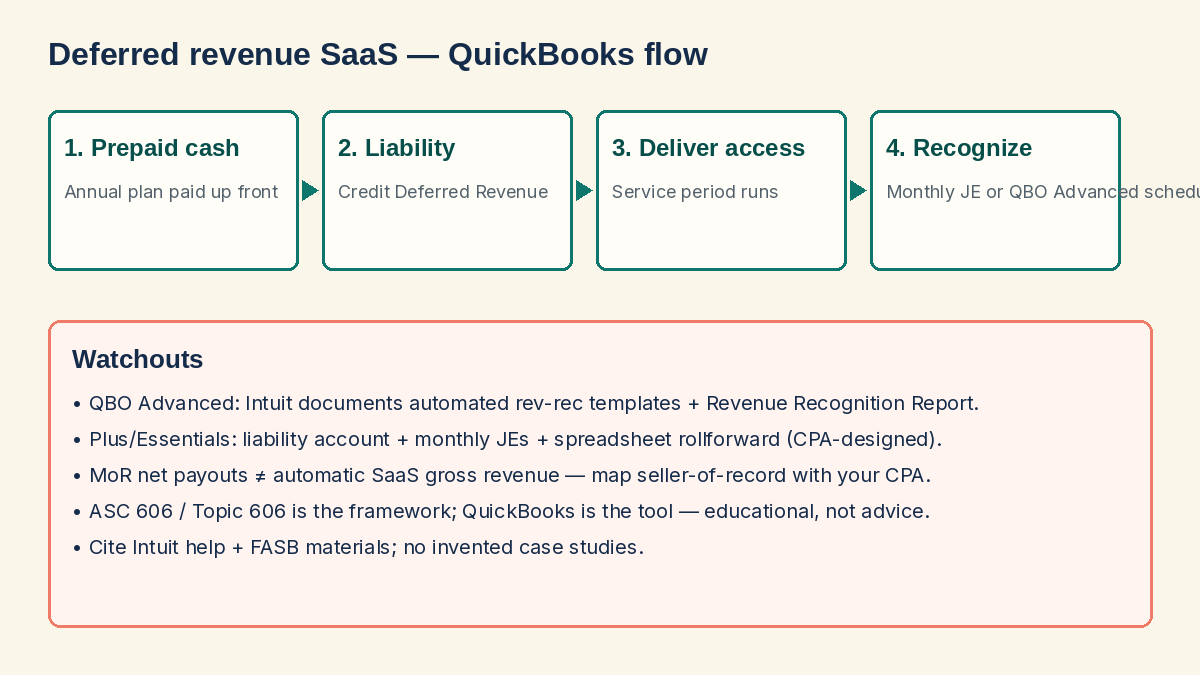
Worked micro-example (illustrative numbers only—not your books): a customer pays $1,200 on January 1 for 12 months of access starting that day. On accrual books you might debit Cash $1,200 and credit Deferred Revenue $1,200. Each month you debit Deferred Revenue $100 and credit Subscription Revenue $100. After six months, deferred revenue remaining is about $600 if nothing else changed. If the same customer had paid monthly $100, cash and revenue often move together and the deferred balance stays near zero—until you sell annual plans again.
Contract modifications break simple 1/12 math: mid-term upgrades, free months, service credits, and early cancellations need a written policy. QuickBooks can store schedules; it cannot invent your commercial policy. Capture start date, end date, and whether recognition is daily or monthly in the same place your CSM changes seats.
Cash vs accrual: where founders get confused
Takeaway: Cash-basis tax books and accrual management/investor packs can both be legitimate—problems start when you mix them without saying which report you are looking at.
| Topic | Cash-oriented view | Accrual / deferred-revenue view |
|---|---|---|
| Annual prepay received | Cash up; often looks like a great month | Cash up; deferred revenue liability up; revenue recognized over months |
| Month with few new sales but many renewals already prepaid | Cash may be quiet | Revenue can still recognize from prior deferrals |
| Refunds / cancellations | Cash out (or credit) | May reverse remaining deferred balance and adjust revenue—process matters |
| MoR net payout | Bank shows net deposit | Need a clear map of fees, tax, and gross sales vs net settlement |
| Typical early LLC tax prep | Often cash-basis with CPA guidance | Investor decks / GAAP-style packs may still need accrual schedules |
QuickBooks Online can present cash or accrual reports depending on settings and how you book transactions. Turning on “accrual” in a report does not magically create correct SaaS schedules if invoices posted everything straight to income with no deferral.
ASC 606 in plain English (educational)
Takeaway: ASC 606 (FASB Topic 606, Revenue from Contracts with Customers) is the US GAAP framework many diligence processes expect for “when is SaaS revenue earned?”—it is not a QuickBooks button.
At a high level, the five-step model asks you to (1) identify the contract, (2) identify distinct performance obligations, (3) determine the transaction price, (4) allocate price to obligations, and (5) recognize revenue when (or as) each obligation is satisfied. For many pure hosted SaaS subscriptions, practice often recognizes fixed subscription fees over time as access is provided. Bundles (implementation, premium onboarding, usage overages, credits) get harder fast.
For primary source framing, see FASB materials on ASC 606 / ASU 2014-09 themes and practitioner handbooks from major firms. This site will not invent allocation percentages or claim your contract is a single performance obligation without reading it. If you are fundraising or selling the company, bring a CPA who has closed SaaS books under Topic 606—not only a bookkeeper who reconciles the bank.
QuickBooks Online Advanced: automated revenue recognition
Takeaway: Intuit documents automated revenue recognition schedules and a Revenue Recognition Report for QuickBooks Online Advanced; confirm your subscription tier before you redesign the chart of accounts around a feature you do not have.
Per Intuit’s QuickBooks Online Advanced marketing and help articles on setting a product/service revenue recognition schedule (titles such as “Set up a product or service’s revenue recognition schedule” on Intuit’s learn-support site), the product-level flow founders and bookkeepers commonly follow is:
- Turn on revenue recognition in account settings (Sales / Products and services area—menu labels move; use Intuit’s current help).
- Create or select a revenue recognition template (method, frequency such as monthly, recognition period).
- Assign the template to a Product/Service item and choose a liability account for the deferred balance.
- Invoice using that item; QuickBooks displays/manages the recognition schedule on the invoice when the feature is active.
- Review progress in the Revenue Recognition Report under Reports (search by that name in Advanced).
Intuit’s public Advanced page describes automatic tracking of deferred revenue so teams are not maintaining every schedule only in spreadsheets. Community and help threads also note that automated deferred revenue / recognition reporting capability is tied to Advanced (not Plus). Approximate 2026 US list pricing for QBO Advanced is often cited around $340/month on Intuit’s pricing page—confirm the live cart; regional offers change. Compare tiers in QuickBooks vs Xero for SaaS founders.
Limits to respect even on Advanced: mid-contract upgrades, credits, and complex multi-element deals may still need accountant judgment or specialized revenue tools. Product-based templates can get awkward if every contract length needs its own item. Treat Advanced as strong automation for straightforward subscriptions—not a full ASC 606 subcontracting system.
Practical Advanced setup tips from public Intuit docs and field practice:
- Name Products/Services by plan term when templates are product-based (for example “Pro Annual — 12 months”) so recognition periods stay obvious
- Use a dedicated deferred liability account—not Accounts Payable
- Run the Revenue Recognition Report after the first live invoice and compare to your mental 1/N math
- Document who may edit schedules on invoices; uncontrolled edits destroy auditability
If you are on Plus or Essentials: liability + journal entry pattern
Takeaway: Without Advanced rev-rec, keep a deferred-revenue liability account, post prepaid invoices to that liability (or clear income into it), and recognize monthly with journal entries your CPA designs.
Educational pattern many bookkeepers use (your CPA must approve accounts and amounts):
- Create a liability account such as Deferred Revenue — SaaS (other current liability).
- When you invoice/receive an annual prepay, ensure the credit hits deferred revenue rather than immediately recognizing the full amount as income—or reclass from income to deferred at month-end if that is your close process.
- Each month, journal entry: debit Deferred Revenue, credit Revenue for the earned slice (for a straight 12-month plan, often 1/12—confirm term and start date).
- Maintain a schedule (Google Sheet is fine) listing customer, contract start/end, total prepaid, monthly recognition, remaining balance; tie the sheet total to the QuickBooks liability balance at month-end.
- Handle refunds by reversing remaining deferred amounts and adjusting cash/AR per your CPA’s method.
Third-party apps exist to automate JEs for non-Advanced tiers; evaluate cost against upgrading to Advanced or moving schedules into a dedicated revenue system later. For tool landscape context, see best accounting tools for SaaS founders.
Stripe, Paddle, and MoR complications in QuickBooks
Takeaway: Your bank deposit is rarely “revenue.” Map gross sales, fees, tax, refunds, and whether an MoR—not you—was the seller of record.
Common friction points:
- Stripe (usually processor): Payouts are net of fees and adjustments. You still need a clear revenue path for subscription invoices or payment links, plus fee expense (or netting method your CPA accepts). Tax collected via Stripe Tax is not the same as earned SaaS revenue.
- Merchant of Record (Paddle, Lemon Squeezy, Polar, etc.): The MoR often faces the end customer as seller. Your company may receive net proceeds under a different commercial relationship. Booking “gross SaaS revenue” equal to every consumer checkout total can be wrong if you are not the seller of record—confirm presentation with your CPA.
- Hybrid: Self-serve MoR + direct Stripe enterprise invoices means two recognition and reconciliation playbooks.
Read next: Merchant of Record vs payment processor, Stripe Managed Payments vs Paddle, and Stripe vs Paddle vs Lemon Squeezy. Deferred revenue schedules only help if the top-line amounts you feed them are the right commercial reality.
Reports investors and CPAs actually ask for
Takeaway: Be ready to show deferred revenue rollforward, remaining performance obligations themes, and how MRR/ARR metrics reconcile to the ledger—without pretending metrics equal GAAP revenue.
- Deferred revenue rollforward: beginning balance + new billings − revenue recognized − refunds/adjustments = ending balance
- Revenue recognition detail: Advanced’s Revenue Recognition Report, or your spreadsheet schedule tied to the GL
- Cash vs accrual P&L: labeled clearly so nobody mixes runway with earned revenue
- Processor/MoR reconciliation: payout → fees → tax → net to bank
- Cohort or remaining term view: how much prepaid service is still owed
ARR and MRR are operating metrics. GAAP revenue under ASC 606 can differ because of timing, credits, multi-element allocations, and principal vs agent presentation. Diligence teams notice when the deck’s ARR and the QuickBooks P&L cannot be reconciled in plain English.
Common mistakes
Takeaway: The expensive mistakes are booking annual cash as day-one revenue on accrual packs, ignoring MoR gross-vs-net, and buying Advanced features without a close process.
- Booking the full annual invoice to income on day one while telling investors you are “accrual”
- Never reconciling deferred-liability balance to a customer-level schedule
- Treating Stripe/MoR net deposits as revenue with no fee or tax map
- Changing plan length mid-year without adjusting the recognition schedule
- Assuming QBO Plus has the same automated rev-rec as Advanced
- Using MRR dashboards as a substitute for a CPA-reviewed revenue policy
- Waiting until a Series A data room to invent schedules for two years of prepaid deals
Founder checklist: deferred revenue readiness
Takeaway: Stand up the liability account, a schedule owner, and a monthly recognition cadence before annual prepaid volume becomes material.
- Confirm with your CPA whether management packs should be cash, accrual, or both (labeled).
- Inventory prepaid SKUs (annual, multi-year, bundles with services).
- If on QBO Advanced: enable rev-rec, templates, liability account, and test one invoice in sandbox/sample flow before production.
- If on Plus/Essentials: create Deferred Revenue liability + monthly JE process + spreadsheet rollforward.
- Document Stripe vs MoR revenue presentation rules with your CPA.
- Close each month with: bank reconcile, processor reconcile, deferred balance = schedule total.
- Before fundraising, practice explaining one annual prepay from cash receipt through twelve recognition entries.
FAQ
What is deferred revenue in SaaS?
It is the liability for subscription service you have been paid for (or billed for) but not yet fully delivered. As you deliver access over the term, you recognize revenue and reduce the liability on accrual books.
Does QuickBooks Online handle deferred revenue automatically?
Automated schedules and the Revenue Recognition Report are documented by Intuit for QuickBooks Online Advanced. Plus and Essentials generally need manual journal entries, spreadsheets, or third-party apps. Confirm on your live subscription and Intuit help.
Is deferred revenue the same as MRR?
No. MRR is an operating metric. Deferred revenue is a balance-sheet liability concept on accrual accounting. They interact but are not interchangeable.
How does ASC 606 relate to QuickBooks?
ASC 606 is the accounting framework; QuickBooks is software. Software can automate schedules that support your policy, but your CPA owns whether treatment matches Topic 606 for your contracts.
How should I book Paddle or Lemon Squeezy payouts?
Often as net proceeds under an MoR relationship rather than as if you were the consumer-facing merchant for every checkout—confirm with your CPA. See MoR vs payment processor.
When should a startup care about deferred revenue?
When prepaid terms are material, when lenders/investors want accrual statements, or when you are building a diligence-ready close. Tiny cash-basis LLCs may still track schedules so you are not surprised later.
Can I stay on cash-basis tax accounting and still track deferred revenue?
Many private companies keep tax books on a cash-oriented method with CPA guidance while maintaining accrual schedules for management or investors. Do not DIY a dual-book design without your CPA.
Is this article accounting advice?
No. It is educational content for SaaS founders. Use a qualified CPA for entries, policies, and audits.
Next step
If QuickBooks is still the right home for your books, compare tiers and SaaS fit in QuickBooks vs Xero for SaaS founders, then scan best accounting tools for SaaS founders. If checkout economics and who the seller of record is are still fuzzy, read MoR vs payment processor and Stripe Managed Payments vs Paddle. For the wider ops map, return to the SaaS founder compliance checklist or Start here.