Accounting · Last reviewed September 29, 2026
SaaS Accounting Software for Founders by Stage
SaaS accounting software for most US founders means QuickBooks Online or Xero as the general ledger, optional Wave only while books stay manual and low volume, then a bookkeeper or SaaS-aware accountant once Stripe or Merchant of Record payouts and payroll make month-end painful. Approximate 2026 US list bands: QuickBooks Online Simple Start $38, Essentials $85, Plus $140, Advanced $340/mo (Intuit pricing; confirm live cart); Xero Early $25, Growing $55, Established $90/mo rising to $27 / $59 / $97 from October 1, 2026 (Xero US pricing update). Pick for CPA familiarity and bank/Stripe sync first—not for a flashy MRR dashboard the GL will never be.
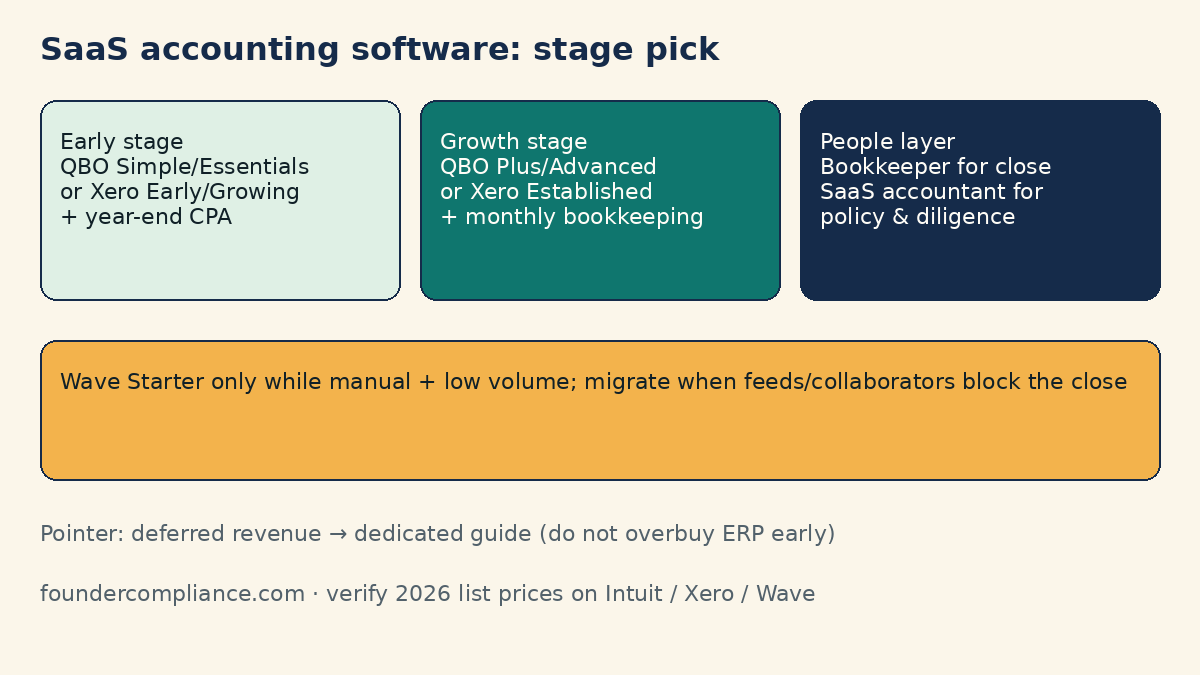
Early-stage vs growth-stage: quick picks (2026)
Takeaway: Match the stack to close quality and advisor fit—not to ARR vanity metrics alone.
| Stage signal | Typical SaaS accounting software | People layer | Skip for now |
|---|---|---|---|
| Pre-revenue / <$10k MRR, founder-only | Wave Starter (manual) or QBO Simple Start / Xero Early | Founder DIY; annual tax-prep CPA | ERP, ASC 606 automation suites, fractional CFO retainers |
| Early stage (~$10k–$100k MRR, first hires) | QBO Essentials/Plus or Xero Growing | Part-time bookkeeper + CPA who knows SaaS | Multi-entity NetSuite-class tools |
| Growth stage (rising ARR, multi-seat product, board reporting) | QBO Plus/Advanced or Xero Established; clean Stripe/MoR mapping | Monthly bookkeeping + SaaS accountant / controller support | Buying “MRR software” that does not reconcile to cash |
For a head-to-head on the two default GLs, see QuickBooks vs Xero for SaaS founders.
2026 pricing bands (verify before you buy)
Takeaway: Use list prices as planning bands; promos and add-ons (payroll, payments, bill pay) change the real invoice.
| Product | 2026 US list signal | Notes for SaaS founders |
|---|---|---|
| QuickBooks Online | Simple Start $38 · Essentials $85 · Plus $140 · Advanced $340 /mo | August 2026 increase hit Essentials/Plus/Advanced; Simple Start unchanged per Intuit communications. User caps rise by plan. Confirm on Intuit pricing. |
| Xero (US) | Early $25 · Growing $55 · Established $90 /mo (→ $27 / $59 / $97 from Oct 1, 2026) | Unlimited users on plans; Early has invoice/bill caps; multi-currency typically on Established. See Xero US pricing and price-update pages. |
| Wave | Starter $0 · Pro ~$19/mo (or ~$190/yr) | Starter keeps invoicing + double-entry; auto bank feeds / richer collaborators need Pro (Wave pricing). US/Canada focus. |
| FreshBooks (fit note) | Tiered subscriptions (confirm live) | Often stronger for service invoicing than subscription SaaS GL depth—evaluate only if your mix is services-heavy. |
Prices exclude sales tax, payroll add-ons, and payment processing. Re-check carts the week you buy—vendor pages move faster than blog tables.
SaaS bookkeeping basics (what the software must support)
Takeaway: Bookkeeping is the weekly habit; accounting software is the system of record that makes that habit cheap.
Before you compare brands, define the SaaS bookkeeping loop your tool must make easy:
- Bank and processor feeds: operating account, corporate card, Stripe or MoR payouts mapped to clear income and fee accounts.
- Recurring revenue hygiene: subscription cash in the bank vs what you later recognize as revenue (liability vs income)—even a simple deferred-revenue liability account beats stuffing everything into “Sales.”
- COGS and tooling: hosting, model APIs, payment fees, and contractor costs categorized consistently for gross margin.
- Payroll and contractors: Gusto/Deel/etc. journals that do not double-count when bank drafts hit.
- Sales tax / VAT signals: if you remitted tax yourself or a MoR did, the GL should not treat tax as revenue. Pair with when a SaaS startup needs sales tax software and MoR vs payment processor.
- Month-end close: reconcile every cash account, review uncategorized spend, lock the period.
If a “SaaS analytics” tool shows beautiful MRR but your bank reconciliation is three weeks behind, you do not have a software problem—you have a bookkeeping problem. Fix the loop first, then upgrade plans.
QuickBooks Online vs Xero for SaaS
Takeaway: Default to the GL your CPA already closes in; secondarily compare user caps, multi-currency, and Stripe app quality.
QuickBooks Online remains the practical US default because more fractional CFOs and small CPA shops live there. Essentials/Plus cover bills, classes/locations (plan-dependent), and a dense App Store (Stripe, Gusto, and many SaaS ops tools). Advanced becomes relevant when you need more users, custom roles, or heavier automation—not because you crossed an arbitrary ARR line.
Xero often wins when your advisor is already Xero-native, you want unlimited users at mid-tier prices, or you need Established-tier multi-currency. US payroll adjacency via Gusto-powered Xero Payroll is an optional add-on—budget it separately.
Neither product is a billing engine. Stripe Billing, Paddle, Polar, or Lemon Squeezy still own checkout; the GL owns the books. For processor/MoR tradeoffs see Stripe vs Paddle vs Lemon Squeezy.
Free and low-cost starters: Wave (and when to leave)
Takeaway: Wave Starter is fine for clean DIY books; leave when bank-feed toil or collaborator access blocks a real close.
Wave’s Starter plan still offers $0 subscription bookkeeping and unlimited invoicing for eligible US/Canada businesses, but automatic bank import and richer collaborator access generally require Wave Pro (~$19/mo per Wave’s pricing page—confirm). That is workable pre-revenue. It becomes expensive in founder time once you have daily Stripe payouts and a bookkeeper who needs reliable feeds.
Upgrade triggers out of Wave: you hire a bookkeeper who refuses the workflow, you need multi-currency or more robust reporting, or your CPA asks for QBO/Xero exports every month. Migrating earlier is cheaper than rebuilding a messy chart of accounts at Series A diligence.
Hiring a SaaS accountant vs buying more software
Takeaway: Software records transactions; a SaaS-aware accountant designs the chart, reviews judgment calls, and prepares tax/investor-ready packages.
Searchers often type saas accountant when month-end hurts. Distinguish three roles:
- Bookkeeper: categorizes transactions, reconciles banks, maintains AP/AR hygiene—often part-time once volume appears.
- CPA / tax accountant: entity elections, returns, reasonable compensation, R&D credit hygiene—usually not your daily categorizer.
- SaaS-fluent controller / fractional CFO: deferred revenue policy, board packs, cash forecasting—overkill before you have recurring complexity or outside capital asking for it.
Buy software alone when the founder can reconcile weekly, volume is low, and a CPA only touches year-end. Hire bookkeeping help when uncategorized transactions pile up or payroll/MoR journals break every close. Hire a SaaS-aware accountant (or upgrade the CPA relationship) when you need revenue recognition policy, multi-state tax questions, or diligence-quality financials—software upgrades will not invent that judgment.
Rule of thumb many early teams use: if you spend more than a few founder hours per week fighting the books, people leverage beats another SaaS seat. If closes are clean but reports are shallow, then consider a higher GL tier or a lightweight FP&A overlay—not a second full accounting suite.
Early-stage vs growth-stage SaaS accounting software picks
Takeaway: Early stage optimizes for low friction and CPA fit; growth stage optimizes for controls, users, and clean revenue schedules.
Early-stage picks
- Default: QBO Simple Start/Essentials or Xero Early/Growing, chosen with your CPA.
- Chart of accounts: separate Stripe/MoR fees, hosting/COGS, contractor software spend, and a deferred-revenue liability even if schedules are spreadsheet-simple.
- Integrations: bank + card + primary payments processor on day one; sales-tax app only when nexus or MoR gaps require it.
- People: annual CPA; bookkeeper when weekly volume exceeds founder patience.
Growth-stage picks
- Default: QBO Plus/Advanced or Xero Established; documented close checklist; user permissions that are not “everyone is admin.”
- Revenue: formalize deferred-revenue schedules; if QuickBooks schedules become painful, read deferred revenue in SaaS with QuickBooks rather than bolting on random “SaaS finance” tools without a GL owner.
- People: monthly bookkeeping + CPA who has closed subscription businesses; consider fractional controller when board reporting cadence is monthly.
- Do not: rip out a working QBO/Xero file solely because a vendor demo showed prettier cohort charts—export analytics separately if needed.
Deferred revenue tooling (pointer, not a second guide)
Takeaway: Keep recognition mechanics out of this roundup—use the dedicated deferred-revenue article when ASC 606 work is real.
Annual prepay, credits, and multi-year deals create deferred revenue. Your GL can hold the liability; specialist tools (and heavier QBO workflows) appear when schedule volume and audit expectations rise. We intentionally do not re-litigate ASC 606 here. Start with Deferred revenue for SaaS in QuickBooks, then revisit whether Advanced, a spreadsheet control, or a billing-to-GL specialist is warranted.
Decision tree: which SaaS accounting stack to buy
Takeaway: Answer advisor fit → volume → collaborators → currency/controls, in that order.
- Does your CPA or bookkeeper already live in QuickBooks or Xero? → Pick that GL unless a hard feature gap exists.
- Still pre-revenue with <20 invoices/month and no bookkeeper? → Wave Starter or lowest paid QBO/Xero tier is enough.
- Daily Stripe/MoR payouts + card spend? → Paid QBO/Xero with reliable bank feeds; skip “free forever” if reconciliation lags.
- Need many human logins or multi-currency? → Model Xero unlimited users / Established vs QBO plan user caps / Advanced.
- Month-end still slipping after software is set up? → Hire bookkeeping help before buying ERP.
- Investors or buyers asking for deferred-revenue schedules? → Tighten policy + see the deferred-revenue guide; do not only buy a dashboard.
When not to buy (yet)
Takeaway: Delay fancy stacks until cash, payroll, or diligence creates a real close requirement.
- You have no business bank account and no processor—formation and banking first (LLC vs C-Corp for SaaS, Start here).
- You are still testing pricing with <10 invoices total—a spreadsheet plus Wave can wait until patterns stabilize.
- You want “automatic MRR accounting” with zero weekly review—that product does not exist in a trustworthy form.
- You are buying Advanced/ERP to impress a seed investor while categories are still “Ask My Accountant.”
Chart of accounts starter list for SaaS
Takeaway: A short, boring chart beats a 200-account template you never maintain.
Minimum accounts many early SaaS files need (names vary by GL):
- Assets: Operating cash; Stripe/MoR clearing (optional); prepaid expenses.
- Liabilities: Deferred revenue; sales tax payable (only if you—not a MoR—owe it); credit cards; accrued payroll.
- Equity: Owner contributions / common stock; retained earnings (system).
- Income: Subscription revenue (recognized); other income (careful—do not dump tax collected here).
- COGS / delivery: Hosting & infrastructure; third-party AI/API usage tied to product; payment processing fees (some teams park fees in expenses—pick one policy and keep it).
- OpEx: Payroll & contractors; software tools; marketing; professional services; insurance.
Resist creating a new account for every SaaS brand you buy. Use classes/tracking categories or vendor fields for tooling detail so the P&L stays readable for your CPA.
How accounting tools pair with payments and sales tax
Takeaway: Your MoR or processor choice changes which tax and fee lines hit the GL—not whether you still need books.
If you sell through a Merchant of Record (Paddle, Polar, Lemon Squeezy, and similar), the MoR often remits many indirect taxes and pays you net. Your books must reflect net deposits and fee expense correctly, and you should not double-accrue tax the MoR already handled. If you sell on Stripe (or similar) as merchant of record yourself, expect more sales-tax software and filing work—see MoR vs payment processor and sales tax software timing.
Payroll tools (for example stacks compared in Deel vs Remote vs Gusto) should sync or journal into the same GL so bank drafts do not create duplicate wage expense.
Common mistakes with SaaS accounting software
Takeaway: Most failures are process mistakes wearing a software costume.
- Booking Stripe charges at gross with no fee or refunds account—margin and cash never reconcile.
- Treating annual prepay as fully earned income on day one, then panicking before diligence.
- Buying a second “SaaS finance” app while the primary GL bank feed is disconnected.
- Giving every contractor full admin access instead of a bookkeeper role.
- Switching from Wave to QBO to Xero every quarter—history quality collapses.
- Ignoring entity hygiene (personal cards, mixed expenses) that no GL can fix alone.
30-day implementation checklist
Takeaway: A boring 30-day setup beats a perfect tool chosen next month.
- Days 1–3: Pick QBO or Xero with your CPA; create the company file; connect operating bank and card.
- Days 4–7: Import opening balances; build the short SaaS chart above; connect Stripe/MoR payout reporting.
- Days 8–14: Categorize 30–60 days of history; define rules for fees, hosting, and contractors.
- Days 15–21: Reconcile every cash account to $0 difference; document the monthly close checklist in a one-pager.
- Days 22–30: Invite the bookkeeper/CPA with least-privilege access; schedule a recurring close date; decide whether Wave (if used) is retired.
FAQ: SaaS accounting software
What is the best SaaS accounting software in 2026?
For most US SaaS teams, QuickBooks Online or Xero. “Best” means the one your CPA can close quickly with clean Stripe/MoR mapping—not the one with the flashiest metrics UI.
Is QuickBooks or Xero better for SaaS?
QuickBooks Online if your US advisors are QB-native. Xero if your firm already runs Xero, you need unlimited users, or Established multi-currency matters. Details: QuickBooks vs Xero.
Do I need a SaaS accountant or is software enough?
Software is enough for low-volume DIY books plus a year-end CPA. Add a bookkeeper when closes slip; engage a SaaS-aware accountant when revenue recognition, multi-state tax, or diligence-quality packages show up.
What does SaaS bookkeeping include?
Bank/processor reconciliation, consistent COGS and fee categorization, payroll journals, basic deferred-revenue tracking, and a locked monthly close. Analytics tools do not replace that loop.
Is Wave good enough for a SaaS startup?
Yes for manual, low-volume US/Canada books on Starter. Plan to migrate when you need reliable auto bank feeds, richer collaborators, or CPA-standard QBO/Xero files.
When should growth-stage SaaS upgrade accounting tools?
When user caps, permissions, multi-currency, or close automation block the close—or when deferred-revenue volume outgrows spreadsheets. Upgrade the process and people in parallel.
How do Stripe or Paddle connect to accounting software?
Via native/bank feeds and apps that import payouts and fees. Always map fees and tax correctly so gross charges are not booked as pure revenue. See payments comparisons linked above.
Can I switch accounting software mid-year?
Yes, but migrate at a period boundary with a trial balance handoff. Switching to chase features mid-diligence is usually worse than cleaning the file you have.
Bottom line
SaaS accounting software is a stage decision: QBO or Xero for nearly everyone who sells software subscriptions in the US, Wave only as a deliberate low-volume starter, and a human bookkeeper/accountant when the calendar—not the marketing site—says the close is failing. Keep deferred-revenue depth in its own guide, keep payments ownership decisions in the MoR/processor cluster, and buy the GL your advisor can actually run.
Next step: Compare QuickBooks vs Xero for SaaS founders, then run the SaaS founder compliance checklist. Soft tool index: tools.