Legal / Privacy · Last reviewed September 24, 2026
Termly vs iubenda vs Termageddon for SaaS Founders
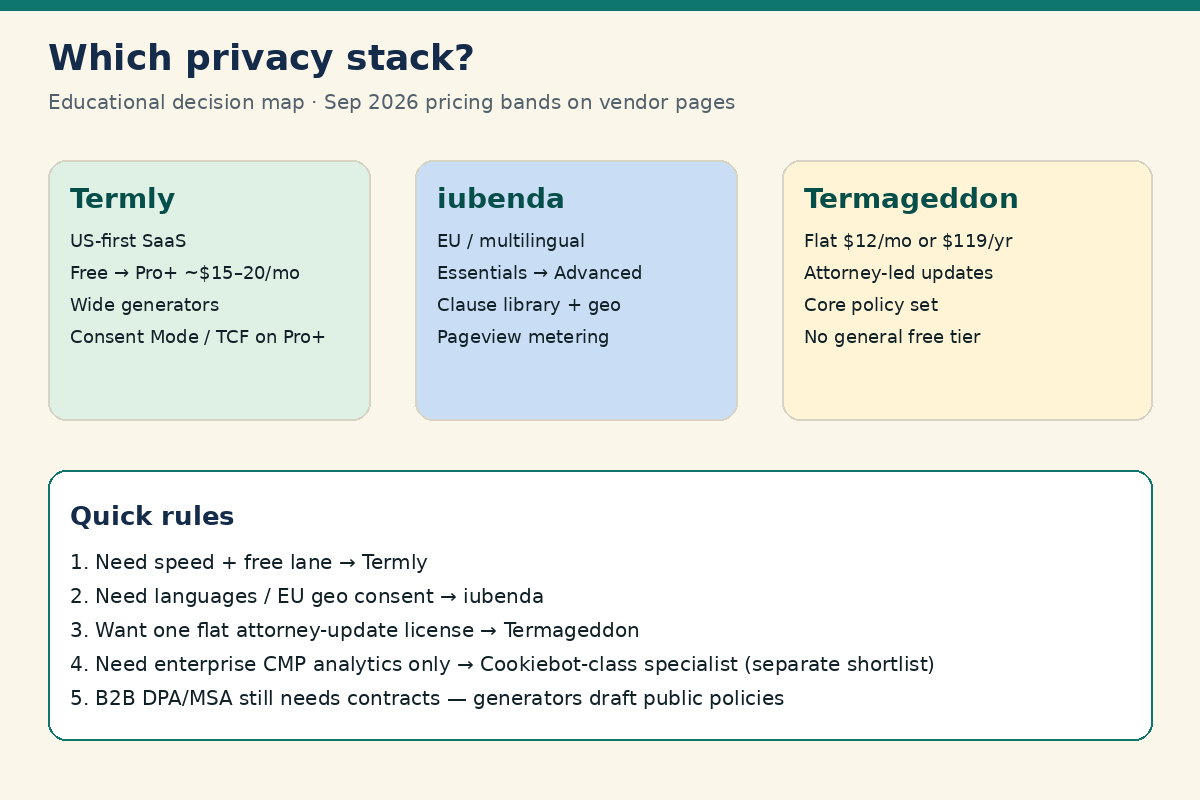
For most early SaaS teams, Termly is the fastest US-friendly start (free tier plus a wide document library; Pro+ lists about $15/month when billed annually on termly.io/pricing). iubenda fits better when you need multilingual or EU-weighted consent and clause-level customization (Essentials about $5.99–$6.99/month billed yearly per site; Advanced about $24.99–$27.99/month on iubenda.com/en/pricing). Termageddon is the attorney-founded auto-update lane at a flat $12/month or $119/year (termageddon.com/pricing) with fewer document types and no general free plan. None of these replaces lawyer-reviewed contracts for serious B2B deals.
Quick comparison table (2026)
Takeaway: Match the tool to your geography and document depth first—price alone misses Consent Mode, languages, and whether you need a free trial lane.
| Factor | Termly | iubenda | Termageddon |
|---|---|---|---|
| Best fit | US-first SaaS; fast setup; broad generators | EU/global / multilingual; clause customization | Attorney-led auto-updating policies; simple flat fee |
| Public pricing band (Sep 2026) | Free; Starter ~$10–$14/mo; Pro+ ~$15–$20/mo (annual vs monthly) | Essentials ~$5.99–$6.99/mo; Advanced ~$24.99–$27.99/mo; Ultimate ~$99.99–$119.99/mo (yearly vs monthly USD shown) | $12/mo or $119/yr flat per site |
| Free tier for businesses | Yes (limited) | Explore / free entry options exist; paid plans for full compliance suites | No general free plan (agency/own-site exceptions per vendor) |
| Document breadth | Wide (privacy, cookie, terms, EULA, more) | Privacy/cookie + T&Cs; deep clause library | Core set (privacy, cookie, terms, disclaimer, EULA) |
| Cookie / CMP emphasis | Strong CMP features on paid plans (scans, Consent Mode v2, IAB TCF on Pro+) | Strong EU CMP + geo-targeting + languages | Consent solution + scanner; attorney update narrative |
| Languages | Multi-language on higher plans | One language on Essentials; all languages on Advanced+ | Focused jurisdictions list (US, CA, IE, UK, EU, AU, ZA per vendor) |
Sources: Termly pricing, iubenda pricing, Termageddon pricing (checked September 2026).
What these tools are (and are not)
Takeaway: Policy generators and CMPs help you publish disclosures and collect cookie consent signals—they do not certify GDPR compliance or replace a Data Processing Agreement for B2B customers.
All three vendors sit in the same buyer category: generate website/app legal documents, keep them closer to current law via vendor updates, and ship a cookie banner / consent workflow. Founders usually buy them to:
- Publish a Privacy Policy and Cookie Policy that track analytics, ads, and subprocessors
- Show a consent banner for EU/UK visitors (and increasingly for US state privacy regimes)
- Block or gate non-essential scripts until consent where the product supports it
- Log consent choices for audits and enterprise questionnaires
They are not a substitute for: a negotiated DPA, MSA redlines, SOC 2 evidence, or counsel when you process sensitive data or sell into regulated verticals. For the document roadmap around generators, see the SaaS legal documents checklist.
2026 pricing bands (verify before you buy)
Takeaway: Budget off published per-site monthly/annual bands, then add pageview overages (especially iubenda) and multi-domain licenses.
Termly
On Termly’s public pricing page (September 2026): a Free plan for limited policies and banner views; Starter commonly listed around $14/month billed monthly or $10/month billed annually; Pro+ around $20/month monthly or $15/month annually annually, with Agency as custom. Pro+ is where many SaaS teams land for weekly scans, logo removal, multi-language, regional rules, Google Consent Mode v2, and IAB TCF 2.3. Always re-check termly.io/pricing because plan names and limits move.
iubenda
iubenda prices per site with pageview caps. USD annual-billing figures shown on the pricing page in September 2026 were roughly: Essentials ~$5.99/mo (up to ~25k pageviews), Advanced ~$24.99/mo (~50k pageviews, geo-targeting, all languages), Ultimate ~$99.99/mo (~150k pageviews, hourly scans, mobile SDK, deeper analytics). Monthly billing is higher. Extra pageviews are metered. Confirm current numbers on iubenda.com/en/pricing (VAT may apply).
Termageddon
Termageddon publishes a simple per-website license: $12/month or $119/year, with one license covering the policy set plus cookie consent solution and automatic updates (termageddon.com/pricing). There is no general free business plan; agencies may get a complimentary license for their own site per vendor marketing.
Cookie consent and CMP feature checklist
Takeaway: For EU/UK traffic, prioritize script blocking, Consent Mode v2, consent logs, and geo rules—not only a pretty banner.
| Capability (ask vendors) | Why founders care | Typical pattern across these three |
|---|---|---|
| Cookie scan frequency | New tags appear after marketing experiments | Termly: quarterly→weekly by plan; iubenda: monthly→hourly by plan; Termageddon: scanner + ongoing monitoring claims |
| Script auto-block before consent | Core ePrivacy / GDPR expectation for non-essential cookies | All three market consent blocking; verify on your stack (GTM, Segment, ads) |
| Google Consent Mode v2 | Needed if you run Google Ads/Analytics with EU audiences | Termly and iubenda emphasize Consent Mode; confirm Termageddon plan details for your setup |
| IAB TCF support | Relevant for ad-tech heavy EU publishers/SaaS marketing sites | Termly Pro+ lists IAB TCF 2.3; iubenda markets IAB-validated CMP; Termageddon partners historically with Usercentrics for consent |
| Geo-targeting / regional rules | Show stricter EU banner without annoying all US visitors the same way | Stronger on iubenda Advanced+ and Termly Pro+ regional rules |
| Consent log / proof | Enterprise questionnaires and dispute defense | Expect paid-plan logging; export and retention policies matter |
| Multi-language policies/banners | EU and LatAm launches | iubenda leads; Termly unlocks on Pro+; Termageddon jurisdiction-focused |
EU vs US framing (educational): Under the EU GDPR and ePrivacy themes, non-essential cookies generally need a valid legal basis—often consent—before they fire, with easy refusal. US state privacy laws (for example California’s framework summarized by the California Attorney General CCPA page) push notice, opt-out of sale/share, and contract language with service providers. A US-only early SaaS may start lighter; the moment you market into the EEA/UK or run aggressive ad pixels, the CMP bar rises quickly.
Where Termly usually fits
Takeaway: Choose Termly when you want the widest document set and the lowest-friction path from zero to a published policy + banner.
Termly tends to win founders who:
- Want a free or low-cost starting point before revenue
- Need several document types (privacy, terms, EULA, shipping/refund-style policies for adjacent products)
- Prefer a US-oriented UX and phone/chat support culture
- Will grow into Pro+ for Consent Mode v2, TCF, and weekly scans
Watch-outs: multi-site costs stack per license; enterprise customization and EU multilingual depth may push you toward iubenda or a dedicated CMP later.
Where iubenda usually fits
Takeaway: Choose iubenda when EU visitors, multiple languages, or clause-level policy control are first-class requirements.
iubenda tends to win when:
- Your marketing site or app is multilingual
- You want geo-targeted consent experiences
- You value a large library of third-party service clauses plus custom clauses
- You may later add adjacent modules (accessibility, DSAR tooling) on the same vendor
Watch-outs: pageview metering can surprise growing content sites; Ultimate pricing is a jump; still edit for product truth—clause libraries are not mind-readers.
Where Termageddon usually fits
Takeaway: Choose Termageddon when you want one flat fee and an attorney-founded “auto-update the policies when laws change” operating model.
Termageddon tends to win when:
- You dislike à-la-carte document upsells
- You want a predictable $12/$119 license covering the core policy set + consent
- You care about the vendor’s attorney-led update narrative more than the widest generator catalog
Watch-outs: fewer document types than Termly; no general free tier; confirm jurisdiction coverage matches where you actually sell.
Cookiebot-class CMPs (soft note)
Takeaway: If your pain is consent-rate optimization and enterprise CMP analytics—not document generation—evaluate a consent-specialist platform separately from these three.
Founders comparing Termly / iubenda / Termageddon often also shortlist Cookiebot-class consent platforms when the banner is the bottleneck (scan quality, multi-domain consent, consent-rate tooling). We do not have a live Cookiebot deep-dive on FounderCompliance yet; treat that as a backlog comparison. For now, decide whether you primarily need documents + good-enough CMP (these three) or a CMP-first stack with policies handled elsewhere. Pair either path with the broader SaaS founder compliance checklist.
How should founders choose by stage and geography?
Takeaway: Pre-revenue US PLG → Termly free/Starter; EU launch or multilingual marketing → iubenda Advanced lane; flat-fee attorney updates → Termageddon; enterprise CMP theater → specialist later.
- Pre-launch, US-heavy, bootstrapped: Termly Free or Starter; publish honest Privacy + Terms; list real vendors.
- First EU/UK paid traffic or ads: Upgrade CMP features (Consent Mode, blocking, logs). Compare Termly Pro+ vs iubenda Advanced on languages and geo rules.
- Agency building many client sites: Ask each vendor about agency/reseller pricing; Termly Agency and iubenda agency plans exist; Termageddon markets agency partners.
- B2B security reviews arrive: Keep the generator, but add DPA/MSA process from the legal documents checklist—do not paste a Privacy Policy into a “DPA” email.
When a policy generator is not enough
Takeaway: Generators draft public-facing policies; high-stakes processing relationships still need contracts and counsel.
- You process employee or health-like data for customers
- Enterprise buyers require a signed DPA with security exhibits
- You train models on customer content and need custom AI clauses
- You operate in regulated industries (fintech, health, kids)
Use the generator for the public site layer, then escalate. Soft internal next step: map documents in the legal checklist and ops timing in the compliance checklist—not a second overlapping generator subscription.
Implementation checklist after you pick a vendor
Takeaway: Shipping the banner without mapping tags is the most common failure mode.
- Inventory tags in GTM / Segment / native scripts (ads, analytics, chat, A/B tests).
- Classify essential vs non-essential; configure blocking rules.
- Generate Privacy + Cookie policies; manually verify every named subprocessors matches production.
- Enable Consent Mode v2 if you use Google Ads/Analytics with EEA/UK traffic.
- Test an EU VPN session: refuse all → confirm marketing pixels do not fire.
- Export a sample consent log; store where security questionnaires can find it.
- Calendar a quarterly rescan after marketing experiments.
- Link policies from footer, signup, and checkout—not only a blog post.
Common mistakes
Takeaway: The expensive mistakes are mismatched disclosures and non-blocking banners—not picking the “wrong” of three solid mid-market tools.
- Publishing a template that lists services you do not use (or omits ones you do)
- Running a banner that does not actually block scripts
- Buying three overlapping tools (generator + CMP + accessibility widget) without an owner
- Ignoring pageview overages until the invoice arrives
- Calling a Privacy Policy a DPA in sales threads
- Never re-scanning after installing a new heatmap or ad pixel
Documents SaaS founders should not ignore
Takeaway: At minimum, align Privacy Policy, Cookie Policy/notice, and Terms with the real product stack—then decide whether the same vendor’s CMP is good enough.
Regardless of Termly, iubenda, or Termageddon, most public SaaS sites need:
- Privacy Policy that names categories of personal data, purposes, retention themes, and the actual processors (payments, email, analytics, support, AI APIs).
- Cookie / tracking notice tied to a working banner when non-essential technologies run—especially for EEA/UK visitors.
- Terms of Service covering accounts, subscriptions, acceptable use, IP, and liability limits that match billing reality (Stripe vs MoR refunds differ).
- Subprocessors awareness for B2B buyers even if your public policy is generator-built.
If you sell B2B and touch customer personal data as a processor, plan a DPA path early. Generators rarely output a negotiation-ready Article 28-style processor contract. Keep that workflow on the legal documents checklist.
Founder scenarios (educational)
Takeaway: Geography and go-to-market motion change the winner more than brand familiarity.
Scenario A — Solo founder, US PLG, $29/mo plan, light analytics. Start on Termly Free/Starter. Publish Privacy + Terms. Keep one analytics tool; avoid installing three heatmaps “just to test.” Revisit when EU signups appear.
Scenario B — Two-founder B2B SaaS with German and French marketing pages. Shortlist iubenda Advanced for languages and geo-targeting. Budget pageviews honestly. Keep Termageddon in the mix only if you prefer flat fee and confirm language coverage for your locales.
Scenario C — Agency shipping 20 client marketing sites. Ask vendors for agency/reseller pricing before buying 20 retail licenses. Termly Agency and iubenda agency motions exist; Termageddon markets agency partners. Standardize a CMP test script so every site verifies blocking.
Scenario D — Ad-heavy growth team running Google Ads into the EEA. Consent Mode v2 and real pre-consent blocking matter more than which generator logo is in the footer. Compare Termly Pro+ and iubenda Advanced/Ultimate on Consent Mode, TCF needs, and consent analytics—then consider a CMP specialist if consent rates become a revenue problem.
When should you not buy (yet)?
Takeaway: Do not pay for Pro+/Ultimate features before you have traffic, tags, or a geography that needs them—but do not launch a tracking-heavy EU campaign on a decorative banner either.
- Skip paid CMP upgrades if you have a waitlist page with no non-essential cookies and no EEA ads.
- Skip buying two generators “for backup.” Pick one draft path and edit for truth.
- Skip Ultimate-tier analytics until someone owns consent-rate optimization weekly.
- Do not skip a working Privacy Policy if you already collect emails or run product analytics.
FAQ: Termly vs iubenda vs Termageddon
1) Which is best overall for SaaS founders?
There is no universal winner. Termly for US-first speed and document breadth; iubenda for EU/multilingual depth; Termageddon for flat-fee attorney-led updates. Match geography and maintenance model.
2) Is Termly free enough for a real SaaS launch?
The free tier helps you start. Growing traffic, multi-language needs, or advanced CMP features usually push teams to Starter or Pro+. Verify current free limits on Termly’s pricing page.
3) Does iubenda cost more than Termly?
Entry Essentials can look cheaper than Termly Pro+, but Advanced/Ultimate and pageview overages change the math. Compare against your monthly pageviews and language needs.
4) Does Termageddon include cookie consent?
Yes—Termageddon’s published license includes a cookie consent solution alongside the policy generators. Confirm feature details for Consent Mode / ad-tech needs against your stack.
5) Do these tools make me “GDPR compliant”?
No tool alone makes you compliant. They help implement disclosures and consent UX. Lawfulness still depends on your processing, contracts, and practices. Read the GDPR text and get counsel for material risk.
6) Can I switch later?
Yes, but migrating banners, consents, and policy URLs takes engineering time. Prefer picking for the next 12–18 months of geography, not only today’s price.
7) When should I hire a lawyer instead?
When you negotiate enterprise DPAs, process sensitive data, expand into regulated markets, or need custom AI/training clauses. Generators remain useful for the public website layer.
8) Where does Cookiebot fit?
Cookiebot-class products are CMP specialists. If consent ops—not document generation—is your bottleneck, shortlist that category separately. A dedicated FounderCompliance Cookiebot comparison is on the backlog; start from this three-way when documents + mid-market CMP are enough.
Bottom line
Use Termly to move fast on a US-first stack with a broad generator set. Use iubenda when languages, geo consent, and EU-weighted modules matter. Use Termageddon when you want one predictable license and attorney-led policy updates. Verify September 2026 pricing on each vendor’s site before you buy, implement real script blocking, and graduate to counsel-backed contracts when B2B risk shows up.
Next step: Map which documents you still need in the SaaS legal documents checklist, place privacy tooling on the broader founder compliance checklist, and use Start Here or the tools hub if you are still sequencing formation, tax, and security work.