Accounting · Last reviewed September 25, 2026
QuickBooks vs Xero for SaaS Founders
For most US SaaS founders with a US CPA or bookkeeper, QuickBooks Online is still the lower-friction default because of accountant familiarity and US tax workflows. Xero is often the cleaner pick when your advisor already runs Xero, you want unlimited users without jumping to Advanced-tier pricing, or multi-currency lives on Xero Established. Approximate 2026 US list prices: QuickBooks Online Simple Start $38, Essentials $85, Plus $140, Advanced $340 per month (confirm on Intuit pricing); Xero Early $25, Growing $55, Established $90 per month, rising to $27 / $59 / $97 from October 1, 2026 per Xero US pricing and Xero’s price-update page. Neither product alone replaces deferred-revenue schedules or SaaS metrics software.
Quick comparison table (2026)
Takeaway: Pick QuickBooks when your US advisor ecosystem is QB-native; pick Xero when advisor fit, unlimited users, or Established-tier multi-currency matter more than US default familiarity.
| Factor | QuickBooks Online | Xero (US) |
|---|---|---|
| Typical US SaaS default | Strong — many US CPAs/bookkeepers standardize on QBO | Strong when the firm already runs Xero |
| List price bands (USD/mo, Sept 2026) | ~$38 / $85 / $140 / $340 (Simple Start → Advanced) | $25 / $55 / $90 (Early → Established); +$2/$4/$7 from Oct 1, 2026 |
| Users | Plan-capped (Simple Start 1; Essentials ~3; Plus ~5; Advanced ~25 — confirm live) | Unlimited users on published US plans (no per-user license fee) |
| Multi-currency | Available on higher QBO configurations — confirm plan matrix on Intuit | Published on Established plan |
| Payment stack fit | Broad US app ecosystem; Stripe/bank feeds common | Strong bank reconciliation UX; Stripe and apps via Xero App Store |
| Payroll adjacency | QuickBooks Workforce / payroll products in Intuit family | Xero Payroll powered by Gusto (optional add-on on US plans) |
| Deferred revenue / ASC 606 | Needs schedule + CPA process (not a SaaS billing engine) | Same — GL + supporting schedules, not native SaaS RevRec product |
| Best first question | “Will my CPA close month-end on this without friction?” | “Is my advisor Xero-native, and do I need Established features now?” |
Pricing citations checked September 2026: quickbooks.intuit.com/pricing; xero.com/us/pricing-plans; October increase xero.com/pricing-plans/update. Promotional first months (for example Xero’s published 90% off for six months for eligible new US orgs, or Intuit intro discounts) are temporary—budget the regular list price.
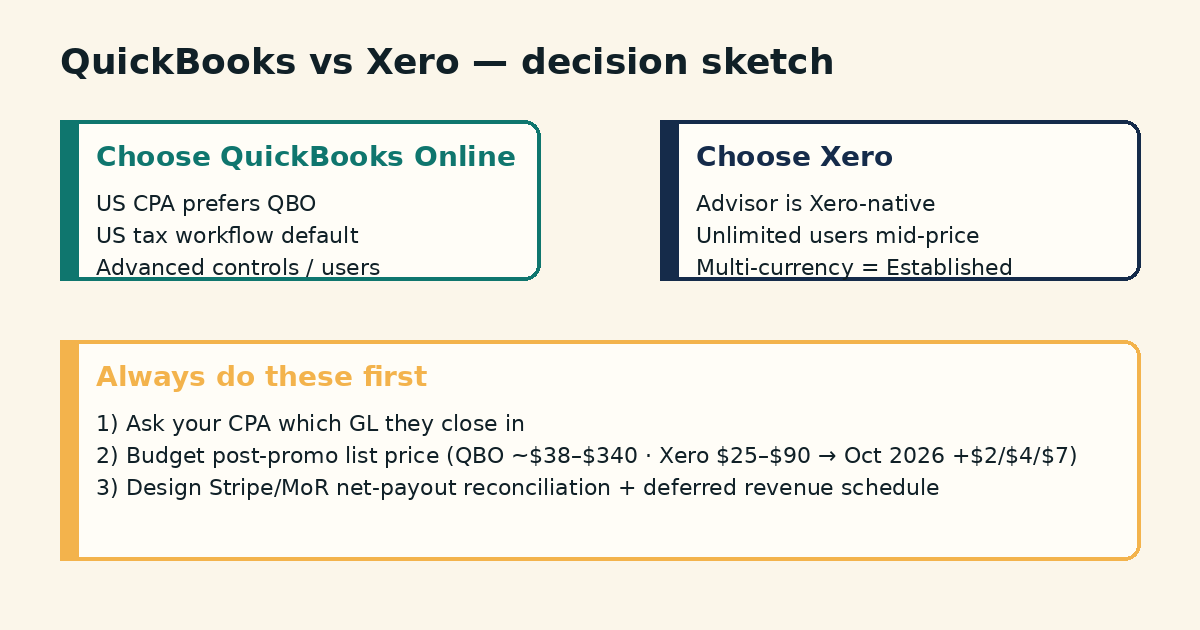
2026 pricing bands you should actually budget
Takeaway: Compare the plan you will live on after promotions expire—SaaS teams usually outgrow Early/Simple Start once invoices, bills, classes, or multi-currency appear.
| Vendor plan | Approx. list USD/mo | SaaS-relevant gate |
|---|---|---|
| QBO Simple Start | ~$38 | Single-user basic books; easy to outgrow with AP + team access |
| QBO Essentials | ~$85 | Bills + more users; common small-team tier |
| QBO Plus | ~$140 | Projects/classes/inventory themes; many growing SMBs land here |
| QBO Advanced | ~$340 | Higher user caps, batch automation, deeper controls |
| Xero Early | $25 → $27 (Oct 1, 2026) | Cap: 20 invoices + 5 bills/mo — SaaS with volume will leave this |
| Xero Growing | $55 → $59 | Unlimited invoices/bills; dashboards; still no multi-currency |
| Xero Established | $90 → $97 | Multi-currency, projects, expense claims, longer forecasts |
Intuit announced higher QBO Essentials/Plus/Advanced standard rates for renewals on or after August 1, 2026 in partner communications summarizing ~$85 / $140 / $340; always re-check the live cart on Intuit because regional offers and add-ons move. Xero’s own update page lists the October 1, 2026 US increases explicitly.
For a wider tool map (not just these two), see best accounting tools for SaaS founders.
What SaaS books need that generic small-business setups miss
Takeaway: Your GL must reconcile processor net deposits; MRR dashboards belong in a metrics tool unless you deliberately build them.
- Subscription cash vs recognized revenue (especially annual prepaid)
- Stripe / Paddle / Lemon Squeezy / PayPal fee and refund lines
- Chargebacks, credits, and failed-payment noise
- Sales tax / VAT collected vs remitted (or MoR-handled)
- Contractor 1099 / payroll / EOR cost coding
- Multi-entity or multi-currency if you expand abroad
- Investor-ready P&L, balance sheet, and cash runway—not only “MRR screenshots”
Accounting software is the system of record. Product analytics and billing tools answer cohort and churn questions poorly when forced into the GL alone.
Stripe, Paddle, and MoR reconciliation
Takeaway: Book net payouts with fee and tax lines—not gross “sales” that never hit the bank.
Whether you use QuickBooks or Xero, the failure mode is the same: importing gross charges while bank feeds show net transfers. Build a monthly close habit:
- Export payout / transfer reports from Stripe or your MoR
- Match each deposit to the bank feed in the GL
- Post processor fees, refunds, and disputes to clear expense/contra accounts
- Separate tax collected (if you are merchant of record) from revenue
- Keep a bridge worksheet when billing-system revenue ≠ cash ≠ recognized revenue
If you are choosing the payment stack itself, compare Stripe vs Paddle vs Lemon Squeezy and Stripe Managed Payments vs Paddle. MoR platforms often deposit net of tax and their fees—your bookkeeper must know which entity is the merchant of record.
Deferred revenue and annual SaaS plans
Takeaway: Annual prepaid cash is often a liability first; recognition follows your policy and CPA guidance—not the day Stripe settles.
Both QuickBooks and Xero can hold deferred-revenue liability accounts and monthly recognition journals. They do not magically apply ASC 606 for you. Practical pattern many early SaaS teams use with CPA oversight:
- Cash receipt → increase cash, increase deferred revenue (liability)
- Each service month → reduce deferred revenue, recognize revenue
- Refunds / cancellations → reverse unearned portions carefully
If your billing volume is high, use a RevRec or billing integration rather than 200 manual journals. We will publish a deeper QuickBooks-oriented deferred-revenue walkthrough on the calendar; until then, treat this as a CPA-owned control, not a DIY tax position. Entity and ownership context (including foreign-owned LLC information reporting themes) still sits outside the GL choice—see Form 5472 for foreign-owned LLCs when that fact pattern applies.
Multi-currency and international founders
Takeaway: If you invoice or hold balances in multiple currencies, confirm the plan gate before you standardize the firm on Early/Growing or a low QBO tier.
Xero’s US feature matrix places multi-currency on Established. QuickBooks Online multi-currency availability depends on plan and region—verify on Intuit’s current compare pages before you promise multi-currency reporting to investors. International founders should also weight bank-feed quality in their country and whether local advisors know the tool. Formation state (for example Wyoming LLC vs Delaware LLC) does not dictate QuickBooks vs Xero, but banking and advisor location often do.
Accountant ecosystem: when QuickBooks is the rational default
Takeaway: A mediocre chart of accounts in the tool your CPA loves beats a pretty UI your CPA refuses to touch.
Choose QuickBooks Online when most of these are true:
- Your CPA/bookkeeper’s templates, checklists, and training are QBO-native
- You file US federal/state returns with a firm that standardizes on Intuit workflows
- You want the largest US small-business app/accountant labor pool
- You expect to hire fractional US controllers who already know QBO Advanced features
Feature shoot-outs matter less than clean month-end. If switching would force your advisor to rebuild every recurring journal, price that soft cost honestly.
When Xero is the cleaner pick
Takeaway: Xero wins on advisor fit, unlimited users at mid prices, and published Established multi-currency—not on “being more modern” as a slogan.
- Your accountant already closes books in Xero
- You want many internal users without jumping to QBO Advanced list pricing
- You need multi-currency on a published plan tier (Established)
- You prefer Xero’s reconciliation UX and App Store stack for your country
- Payroll-via-Gusto adjacency on Xero US plans matches your headcount plan
Do not pick Xero solely because a Twitter thread dunked on QuickBooks. Pick it because the close process will be faster for your people.
Decision tree
Takeaway: Ask advisor preference first, then currency/users, then list price.
- Does your CPA/bookkeeper strongly prefer one platform? → Follow them unless you are changing firms.
- Do you need multi-currency this year? → Confirm QBO plan eligibility or budget Xero Established.
- Will more than a handful of people need login access? → Model Xero unlimited users vs QBO plan user caps.
- Is your payment stack MoR-heavy (Paddle/LS) or Stripe-direct? → Either GL works; invest in reconciliation design either way.
- Are you pre-revenue with <20 invoices/month? → Xero Early or QBO Simple Start can be enough temporarily; plan the upgrade path.
- Still tied? → Default QuickBooks for US-only advisor networks; default Xero when the firm is already Xero-native.
Implementation checklist after you choose
Takeaway: The first 30 days are chart-of-accounts design and feed hygiene—not logo colors.
- Lock a SaaS-aware chart of accounts (revenue, deferred revenue, processor fees, tax payable, COGS if any)
- Connect bank and credit-card feeds; fix unmatched rules weekly
- Document Stripe/MoR posting policy in one page your bookkeeper owns
- Turn on sales-tax/VAT codes only with CPA guidance
- Separate founder draws / owner pay from operating expenses
- Schedule a monthly close checklist (reconcile → deferred schedule → financials PDF)
- Decide what lives in the GL vs a metrics tool (MRR, churn, cohorts)
- Store app credentials and 2FA recovery in a shared vault for the finance seat
Integrations and the “app store” test
Takeaway: Test the three apps you cannot live without—billing, payroll, and expense capture—before you standardize the company on either GL.
Both platforms market large app ecosystems. For SaaS, the only integrations that matter in month one are usually:
- Bank feeds for operating and reserves accounts
- Stripe (or MoR) reporting path into the GL
- Payroll / Gusto / EOR journal import
- Bill pay / AP if you have vendors in multiple currencies
- Receipt capture for founder and team spend
Run a 15-minute dry test: can your bookkeeper pull last month’s Stripe payout report and land it in a clean journal with fees separated? If the answer is “we will figure it out later,” you do not have a stack—you have a hope. QuickBooks’s US marketplace density helps when you hire US fractional finance talent. Xero’s App Store density helps when your advisor already knows preferred Xero apps in your country.
Reporting: GAAP-ish statements vs founder dashboards
Takeaway: Use the GL for P&L, balance sheet, and cash; use a metrics layer for MRR bridges unless you enjoy fragile spreadsheet joins.
Founders often blame QuickBooks or Xero for “not showing MRR.” That is usually a category error. Both tools can produce standard financial statements and custom reports. Neither is ChartMogul. A workable split:
- In the GL: revenue (recognized), deferred revenue, cash, AR if any, processor fees, tax payable, operating expenses by class/department if you use them
- In billing/metrics: MRR, ARR, net revenue retention, cohort churn, trial conversion
- In the board pack: a one-page bridge that explains cash collected vs recognized revenue for the period
If investors ask for accrual statements, your CPA’s close process on either tool matters more than which logo is on the login screen. If you only need cash-basis tax prep for a tiny LLC, say that out loud so you do not overbuy Advanced features.
Team permissions, auditors, and “everyone has admin”
Takeaway: Limit who can create vendors, run payroll-adjacent bills, and export full books—especially once ARR is real.
QuickBooks Online Advanced markets deeper custom roles and automation aimed at growing teams. Xero’s unlimited users make it easy to invite the whole company—which is convenient and risky. Practical controls on either system:
- Separate “bookkeeper,” “founder read,” and “AP clerk” roles where the product allows
- Keep bank-account edit rights narrow
- Turn on audit trails / history and actually glance at them after close
- Remove ex-contractor logins the same week contracts end
Permissions will not replace SOC 2 controls, but sloppy GL access shows up in diligence. For security-program tooling later, that is a different category than bookkeeping.
Cost sketch: year-one software only
Takeaway: On mid tiers, Xero Growing (~$55–$59) is often cheaper than QBO Essentials/Plus list pricing; Advanced vs Established is a different conversation once you need heavy controls or multi-currency.
| Sketch (software list only) | Approx. annual | Notes |
|---|---|---|
| QBO Essentials @ $85 × 12 | ~$1,020 | Before payroll add-ons / promotions |
| QBO Plus @ $140 × 12 | ~$1,680 | Common growing SMB landing zone |
| QBO Advanced @ $340 × 12 | ~$4,080 | Buy for controls/users/automation—not vanity |
| Xero Growing @ $55→$59 × 12 | ~$660–$708 | Post-promo; Oct 2026 rate applies from effective date |
| Xero Established @ $90→$97 × 12 | ~$1,080–$1,164 | Budget this if multi-currency is required |
These sketches exclude bookkeeper hours, CPA review, Stripe fees, payroll per-seat charges, and migration projects. A $400/year software “savings” is irrelevant if it costs 20 advisor hours to support an unfamiliar GL.
Common mistakes
Takeaway: The expensive errors are gross-vs-net booking, ignoring deferred revenue, and choosing software before choosing an advisor.
- Picking a tool from a feature grid, then discovering your CPA will not support it
- Booking gross Stripe volume as revenue
- Treating annual prepay as fully earned on day one without a policy
- Using Early/Simple Start forever after invoice volume explodes
- Expecting the GL to replace ChartMogul/Baremetrics-style metrics
- Migrating mid-year without a cutover reconciliation
- Mixing personal spend into the operating entity without clear coding
FAQ
Is QuickBooks better than Xero for SaaS?
For many US SaaS founders with US accountants, QuickBooks Online is the practical default. Xero can be better when your advisor, user-count, or multi-currency needs fit Xero’s plans. “Better” means faster accurate closes for your team.
How much do QuickBooks and Xero cost in 2026?
As of September 2026 checks: QBO list tiers are commonly shown around $38 / $85 / $140 / $340 monthly; Xero US list is $25 / $55 / $90 with published increases to $27 / $59 / $97 from October 1, 2026. Confirm live vendor pages and ignore promo pricing for long-range budgets.
Which Xero plan do SaaS founders usually need?
Growing if you exceed Early’s invoice/bill caps; Established if you need multi-currency or the advanced Established feature set. Price the plan you will be on by year-end, not the teaser tier.
Can QuickBooks or Xero handle deferred revenue?
Yes, as liability accounts plus recognition journals or connected RevRec tools. Neither removes the need for a written revenue policy and CPA review when statements matter.
Do I need separate SaaS metrics software?
Usually yes once you care about MRR bridges, cohorts, and churn. The GL answers books and tax; metrics tools answer product finance questions.
Can I switch from QuickBooks to Xero later?
Yes. Migration cost is chart mapping, open invoices/bills, payroll history, and reconciliation rebuilds. Clean books make it cheaper; messy books make it painful.
What about inventory-heavy SaaS adjacent businesses?
If you ship hardware or merch at scale, re-check inventory features and apps on both platforms (including Xero Inventory Plus add-on). Pure software GL needs differ from SKU inventory needs.
Does entity choice (Wyoming vs Delaware) change the software decision?
Rarely. Advisor location and banking matter more than formation state. State comparison: Wyoming LLC vs Delaware LLC.
What to do next
Takeaway: Lock advisor preference, budget the post-promo plan, then design Stripe/MoR reconciliation before you migrate history.
Start with the broader map in best accounting tools for SaaS founders, align your payment stack via Stripe vs Paddle vs Lemon Squeezy, then put month-end books on the same calendar as the rest of the SaaS founder compliance checklist or Start Here.